Is it possible to create a (fullscreen window) display so that it is always in front?
In a multi-monitor configuration like this:
{"name":"607332","src":"\/\/djungxnpq2nug.cloudfront.net\/image\/cache\/5\/d\/5da3049d8c624dd915871ee08ae0bbb6.png","w":478,"h":269,"tn":"\/\/djungxnpq2nug.cloudfront.net\/image\/cache\/5\/d\/5da3049d8c624dd915871ee08ae0bbb6"}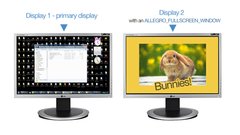
If I drag a window over, that window becomes the focused window and is brought to the front, on top of the allegro display:
{"name":"607333","src":"\/\/djungxnpq2nug.cloudfront.net\/image\/cache\/d\/2\/d28c445acf967ef59e5cf2caf197cd9d.png","w":478,"h":269,"tn":"\/\/djungxnpq2nug.cloudfront.net\/image\/cache\/d\/2\/d28c445acf967ef59e5cf2caf197cd9d"}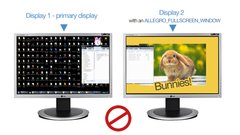
But I want the display to always be on top, like a powerpoint presentation window:
{"name":"607331","src":"\/\/djungxnpq2nug.cloudfront.net\/image\/cache\/4\/8\/4894e3d65d89b11c104c3209d7dcabb1.png","w":478,"h":269,"tn":"\/\/djungxnpq2nug.cloudfront.net\/image\/cache\/4\/8\/4894e3d65d89b11c104c3209d7dcabb1"}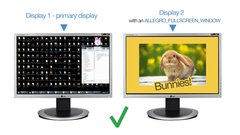
Is there a setting for that somewhere?
I don't understand what you're trying to do...... hahahahahaha I'm kidding. You almost made a movie there man!.
Anyway, and what if you create a "real" fullscreen display in the second monitor? is not possible? I think that way nothing would be able to get on top.
I don't understand what you're trying to do.
Ok, that was funny. 
Anyway, and what if you create a "real" fullscreen display in the second monitor? is not possible? I think that way nothing would be able to get on top.
The problem with that is when I just select a window in the primary display, the fullscreen is disappears (minimizes?)
The problem with that is when I just select a window in the primary display, the fullscreen is disappears (minimizes?)
Awww it's true. But I'm almost 100% sure that there is a way of doing it with the Windows handler (you know the HWND stuff) but I haven't done it before.
You'll probably need to get the Handler (al_get_win_window_handle(ALLEGRO_DISPLAY *display)) and then with some Windows specific code set it to be at the top all the time.
Maybe using something like SetWindowPos?
You'll probably need to get the Handler (al_get_win_window_handle(ALLEGRO_DISPLAY *display)) and then with some Windows specific code set it to be at the top all the time.Maybe using something like SetWindowPos [msdn.microsoft.com]?
That's it!!! 
AMCerasoli, you're a genjus!!!
I just added this code:
  HWND window_handle = al_get_win_window_handle(control_display->display);
  SetWindowPos(window_handle, HWND_TOPMOST, 0, 0, 0, 0, SWP_NOMOVE + SWP_NOSIZE);
[edit] That makes me so haappyyyy!!! 
Now set that same flag on the other window and see what happens.
Oh neat. It's like a topmost group.
Needs more bunnies.
Needs more bunnies.
Ditto.
Well I want to announce to everybody that Mark asked me to get marry with him. He sent me a PM because he was afraid that I could reject him.
The wedding is around 15 of April of this year in Tokyo. You're of course all invited.
That makes me so haappyyyy!!!
Me too!
Congrats!
Well I want to announce to everybody that Mark asked me to get marry with him.
{"name":"607335","src":"\/\/djungxnpq2nug.cloudfront.net\/image\/cache\/3\/5\/35d34c734e7448f1e0307f7f2356b28e.gif","w":500,"h":281,"tn":"\/\/djungxnpq2nug.cloudfront.net\/image\/cache\/3\/5\/35d34c734e7448f1e0307f7f2356b28e"}
Well..... OK  .
.
But we have to get a prenup. You ain't gettin' my Bitcoinzz! 
[edit]
On topic, I should note that when using ALLEGRO_FULLSCREEN_WINDOW, it does not have the expected behavior and a dragged window will appear above it. However, if the display is created with ALLEGRO_NOFRAME then it does work as expected.
SWP_NOMOVE + SWP_NOSIZE
Nit pick, but those mean don't honor the position and size parameters from the call, not what the comment says. 