Well, here's what I have learned how to do after a semester long class in Java :
{"name":"606018","src":"\/\/djungxnpq2nug.cloudfront.net\/image\/cache\/d\/9\/d921e9bf51a2c1f9631a1dbff79e760c.png","w":803,"h":598,"tn":"\/\/djungxnpq2nug.cloudfront.net\/image\/cache\/d\/9\/d921e9bf51a2c1f9631a1dbff79e760c"}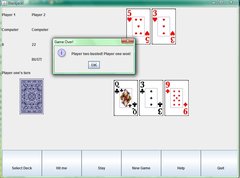
Executable jar file of BlackJack game Here's an updated, working version
It's really simple, but I thought I would share in case anyone wanted to try it.
I have jdk 1.6 so I can't run your jar because you compiled it with a jdk7 compiler. Can you add add -target 1.6 to your compile line and try again?
 $ java -jar BlackJack.jar
Exception in thread "main" java.lang.UnsupportedClassVersionError: BlackJack : Unsupported major.minor version 51.0
 $ java -version
java version "1.6.0_22"
OpenJDK Runtime Environment (IcedTea6 1.10.6) (6b22-1.10.6-0ubuntu1)
OpenJDK Server VM (build 20.0-b11, mixed mode)
c:\Office\Education\Kirkwood\Spring2012\CompSci\Javacode\Homework4>javac -target 1.6 BlackJack.java
javac: target release 1.6 conflicts with default source release 1.7

c:\Office\Education\Kirkwood\Spring2012\CompSci\Javacode\Homework4>java -version
java version "1.7.0_02"
Java(TM) SE Runtime Environment (build 1.7.0_02-b13)
Java HotSpot(TM) Client VM (build 22.0-b10, mixed mode, sharing)
Is there some jar to exe program out there I can use instead?
Use -source 1.6 too.
I don't know of any working jar to exe programs..
Okay, here's an updated version :
Argh, looks like you are using a 1.7 only method.
$ java -jar BlackJack\ \(1\).jar
Exception in thread "main" java.lang.NoSuchMethodError: java.awt.Container.revalidate()V
        at BlackJack.<init>(BlackJack.java:219)
        at BlackJack.main(BlackJack.java:256)
http://docs.oracle.com/javase/7/docs/api/java/awt/Component.html#revalidate()
Do you suppose you can avoid that method?
Well, I've had problems with gui elements not appearing correctly without it, but I can try it anyway.
The game works now but the card faces don't show up.
Hmm... They're probably just failing to load from the jar file. Do I need to have something about the class path in the manifest file when I make the jar?
They're in a folder called cards80x120, and that's where they're loaded from in the program.
Here's the jar creation line I use :
jar cvfm BlackJack.jar BlackJack.mf .class cards80x120/*.*
Well did you try it yourself? Try running the jar from a directory other than the one where 'cards80x120' is available.
Are you using getClass().getResource() to get the files from the jar?
I did try it myself, and it doesn't work for me either, but I didn't know how to fix it.
What does getClass().getResource() give you? The directory where the class file is being run from? Is getClass a method of the Object class? I need to look it up quick...
Edit
What name do I pass to getResource(String)?
Its a way to get a URL from the jvm. Possibly a shorter path is to make a direct call to ClassLoader.getSystemResource(). You should be able to pass the resulting URL to the image loading classes.
What name do I pass to those functions? The name of the image file?
Yea, give the path of the file as it exists inside the jar. So if you have
$ unzip -l foo.jar
x.class
peanut.jpg
Then pass "peanut.jpg" as the path.
Alright, this version should work for you now...
Works great now, good job!
Cool, that's good. I know it's just a simple blackjack game, but it's my first graphical and gui based Java game, so I'm happy with it.
No, that has nothing to do with my college class, or this assignment. The assignment was just for a card game, command line or graphical, and I chose Blackjack with a gui.