Allegro is now officially supported by GWEN. ( http://code.google.com/p/gwen/ ) Big thanks to chinbillybilbo for their work on the renderer.
{"name":"604918","src":"\/\/djungxnpq2nug.cloudfront.net\/image\/cache\/5\/7\/57f6d4291d52c9346c7f722ccd285e3c.png","w":1040,"h":806,"tn":"\/\/djungxnpq2nug.cloudfront.net\/image\/cache\/5\/7\/57f6d4291d52c9346c7f722ccd285e3c"} {"name":"604919","src":"\/\/djungxnpq2nug.cloudfront.net\/image\/cache\/0\/c\/0c2ab57e8773f371b8bfa89fa8a28321.png","w":1040,"h":806,"tn":"\/\/djungxnpq2nug.cloudfront.net\/image\/cache\/0\/c\/0c2ab57e8773f371b8bfa89fa8a28321"}
 {"name":"604920","src":"\/\/djungxnpq2nug.cloudfront.net\/image\/cache\/2\/3\/230a2d2ba00c773443acd56766016dcd.png","w":1040,"h":806,"tn":"\/\/djungxnpq2nug.cloudfront.net\/image\/cache\/2\/3\/230a2d2ba00c773443acd56766016dcd"}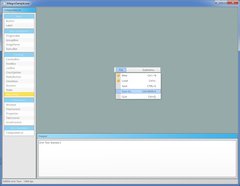
You can download the sample (for windows) here:
http://code.google.com/p/gwen/downloads/detail?name=GWEN-WinSamples-4.zip
I threw the sample and input class together from other examples I'd downloaded.. and I'm hoping they're fully cross platform. I was hoping someone would take a look at it to make sure I'm not doing something stupid.
Sample: http://code.google.com/p/gwen/source/browse/trunk/trunk/gwen/Samples/Allegro/AllegroSample.cpp
Renderer: http://code.google.com/p/gwen/source/browse/trunk/trunk/gwen/Renderers/Allegro/Allegro.cpp
Input: http://code.google.com/p/gwen/source/browse/trunk/trunk/gwen/include/Gwen/Input/Allegro.h
Also, sorry if this looks like a repost. The other GWEN related thread seemed to get a bit off topic - and wasn't really announcing support for it.
Let me know if you have any questions 
I see awfully little images in your post. Is this about some GUI toolkit?
Screenshots are nice. You can also attach files to your post,
or show code in <code>code goes here...</code> tags.
How about a complete widget list?
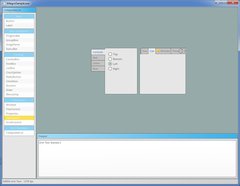
Here's some screenshots showing a few of the widgets. The list of widgets down the left shows the majority of the available widgets.
Use the img tags with <>, not []
Like that:
{"name":"604915","src":"\/\/djungxnpq2nug.cloudfront.net\/image\/cache\/5\/7\/57f6d4291d52c9346c7f722ccd285e3c.png","w":1040,"h":806,"tn":"\/\/djungxnpq2nug.cloudfront.net\/image\/cache\/5\/7\/57f6d4291d52c9346c7f722ccd285e3c"}{"name":"604916","src":"\/\/djungxnpq2nug.cloudfront.net\/image\/cache\/0\/c\/0c2ab57e8773f371b8bfa89fa8a28321.png","w":1040,"h":806,"tn":"\/\/djungxnpq2nug.cloudfront.net\/image\/cache\/0\/c\/0c2ab57e8773f371b8bfa89fa8a28321"}
{"name":"604915","src":"\/\/djungxnpq2nug.cloudfront.net\/image\/cache\/5\/7\/57f6d4291d52c9346c7f722ccd285e3c.png","w":1040,"h":806,"tn":"\/\/djungxnpq2nug.cloudfront.net\/image\/cache\/5\/7\/57f6d4291d52c9346c7f722ccd285e3c"}
Looks nice BTW. A pity it's C++ only, I only use C ^^
Edit: and you forgot to add a / at the end of the url, after the closing "
Thanks!
Thanks for the UI Garry.  It was quite easy to add Allegro support due to your good design, and to Allegro (5!) being a very practical library. A happy marriage.
Cheers!
Congratulations for this library. Some questions:
1) when documentation will be available.
2) when layout management will be available.
What kind of layout management do you want? Here's how it's done right now:
What kind of layout management do you want? Here's how it's done right now:
How about laying widgets in rows, in columns, in a grid, etc.
If you want to lay widgets in a row you'd just dock them all left (or right) in a child panel. To lay in a row vertically you'd dock top.
You can lay them out manually in a child panel, by overriding the Layout function. In there you'd set the position and size manually, using whatever you want.
We have a few layout controls to make your life easier, but this is something that could definitely be expanded upon. I'm trying to keep things as simple as I can right now.
Here's the layout controls:
Garry, what is your plan regarding documentation? it is hard to browse the source code, just to learn the basics.
I'm planning to document some of the simple things that people have pointed out (laying out, widget list, margin vs padding).
But I want to produce a few heavily commented samples to show how things are meant to work in the wild rather than relying on just docs. I prefer this method as docs can go out of date - but the samples will be updated along with any changes to the codebase.
I'm thinking a couple of simple things, like a calculator/model viewer just to help people understand how it all fits together.
Some other questions:
1) how does focus work.
2) how does modality work.
3) how do menus work.
There's two types of focus, keyboard and mouse. Mouse focus is simply the control you're hovering over. Keyboard focus is similar to windows focus - in that you press tab to go to the next control.
Modal panels are simply just screen sized panels that block out input to everything else - because you can't click through them. The modalled control is a child of that control - so you can still interact with it.
I don't understand what you want to know about menus?
I don't understand what you want to know about menus?
Win32 popup menus block the main event queue. Does this happen with your GUI? I think not, but I'd like a confirmation.
Furthermore, how do you handle events, when a menu is closed and when a menu is opened? a menu is a modal structure, but it consists of many top-level widgets. In Win32, if a menu is open, windows receive mouse movement events, and mouse click events, but Win32 knows if a menu is open and closes the menu before the window receives the mouse click event.
No the menu is just a control that floats above everything else. When you click on something that isn't derived from a menu it closes all open menus.
You can see examples of all the controls usage here: http://code.google.com/p/gwen/source/browse/#svn%2Ftrunk%2Ftrunk%2Fgwen%2FUnitTest
This is the menu one:
http://code.google.com/p/gwen/source/browse/trunk/trunk/gwen/UnitTest/MenuStrip.cpp
which creates this menu
{"name":"230a2d2ba00c773443acd56766016dcd-1024.jpg","src":"\/\/djungxnpq2nug.cloudfront.net\/image\/cache\/2\/b\/2b5bfc8ce131ea9c64373cc4c1bb1f7a.jpg","w":1024,"h":793,"tn":"\/\/djungxnpq2nug.cloudfront.net\/image\/cache\/2\/b\/2b5bfc8ce131ea9c64373cc4c1bb1f7a"}
Looks really nice!. I'm definitely giving it a try.
No the menu is just a control that floats above everything else. When you click on something that isn't derived from a menu it closes all open menus.
Does the menu have a parent widget, i.e. is it a child of the root widget, or it is a standalone widget?
And how do you close the menu when the user clicks outside of it? do you have an 'if menu is open then close it' statement somewhere in the event handling code?
Basically yes. The menu is a child of the canvas (the root panel).
bool Gwen::Input::OnMouseClicked( Controls::Base* pCanvas, int iMouseButton, bool bDown )
{
        // If we click on a control that isn't a menu we want to close
        // all the open menus. Menus are children of the canvas.
        if ( bDown && (!Gwen::HoveredControl || !Gwen::HoveredControl->IsMenuComponent()) )
        {
                pCanvas->CloseMenus();
        }
And
bool Base::IsMenuComponent()
{
        if ( !m_Parent ) return false;
        return m_Parent->IsMenuComponent();
}

void Base::CloseMenus()
{
        for ( Base::List::iterator it = Children.begin(); it != Children.end(); ++it )
        {
                (*it)->CloseMenus();
        }
}
Ok, thank you for the replies.
There's something wrong with the build system on Linux:
% make Sample-Allegro verbose=1
==== Building Renderer-Allegro (release) ====

Creating obj/Release/Renderer-Allegro
mkdir -p obj/Release/Renderer-Allegro
Allegro.cpp
g++ -MMD -MP -DNDEBUG -I../../../include x86_64 -g -O2 -ffast-math -fno-rtti -o "obj/Release/Renderer-Allegro/Allegro.o" -c "../../../Renderers/Allegro/Allegro.cpp"
g++: x86_64: No such file or directory
make[1]: *** [obj/Release/Renderer-Allegro/Allegro.o] Error 1
make: *** [Renderer-Allegro] Error 2
Where is that x86_64 coming from?
edit: the ARCH variable. I can suppress it by running make ARCH=
Linking with -lalleg won't work. That's for Allegro 4. The sample program requires at least: -lallegro -lallegro_image -lallegro_font -lallegro_ttf -lallegro_primitives. It would be best to use pkg-config to pull in the libraries; I don't know if that's possible with premake.
edit See the patch. Dunno about pkg-config.
The Allegro sample pegs the CPU unnecessarily. It should use al_wait_for_event instead of al_get_next_event so that it blocks.
edit see patch.
The patch also passes through mouse wheel events.
Garry, one last question: how do you handle menu bars? menu bars are not children of the root panel, obviously.
Thanks for the patch!
The menu bar (menu strip) is just a control - like a button. You can put it anywhere you want.
The menu bar (menu strip) is just a control - like a button. You can put it anywhere you want.
It is, but how do you handle the modality of it, since menu bars have sub menus which are pop ups?
Is a menu bar positioned above the panel that closes a menu?
And if so, does this happen automatically, or does the programmer has to do so manually?
All panel interactions potentially close the menu. Unless you've clicked on a menu component.
The sub menus aren't children of the strip menu, they're children of the main canvas - pushed out to the front.
Congratulations man! I have ran the example, it looks VERY nice.
Just some details, I can't avoid to see them. 
In the SFML version: a white line.
In the Allegro version: some overlapping
All versions: It went to far
In Allegro version: Less looking cool gradient
{"name":"604968","src":"\/\/djungxnpq2nug.cloudfront.net\/image\/cache\/6\/9\/69f542d9fb046fe068150bbc91d035f7.png","w":454,"h":277,"tn":"\/\/djungxnpq2nug.cloudfront.net\/image\/cache\/6\/9\/69f542d9fb046fe068150bbc91d035f7"}
Thanks - I'll check those out!
Hi there, it's me again...
I think you did this GUI just in time to use it in one of my projects. I need to create some binary files, the console would be enough the problem but I need UTF-8 support, and I don't get it working properly.
Anyway I tried to compile your library, but I got this error:
..\..\..\include\Gwen\Controls\Base.h|288|error: 'Gwen::Utility' has not been declared|
So I added #include "Gwen/Utility.h" to Base.h
Started compiling again, but then this:
..\gwen\src\Utility.cpp|23|error: invalid conversion from 'unsigned int' to 'const wchar_t*'|
In this part:
UnicodeString Gwen::Utility::Format( const wchar_t* fmt, ... ) { wchar_t strOut[ 4096 ]; va_list s; va_start( s, fmt );vswprintf( strOut, sizeof(strOut), fmt, s );va_end(s); UnicodeString str = strOut; return str; }
I have being reading, but besides vswprintf() is deprecated for security reasons I couldn't find anything.
---
MinGW 4.5.2
Code::Blocks
Allegro 5.0.4
Sorry for the delayed reply. I'll have to check into that function because it really does seem platform specific - even though it's meant to be standard.