I have this link... with an expired page and a members-only page...so I'm forced to refer to this link...
Honestly most of the stuff on that page means nothing to me -- I pretty much require a step-by-step approach for this, and it's not clear (to me, at least) what to do.
I see involvement with Xcode, the Terminal, Cocoa, and QuickTime. Someone had told me XCode came with Cocoa already...I don't know about QuickTime. And then I have the 4.4 source...but I really don't know what to do with it.
Anyone have a step-by-step guide to this?
I saw some Terminal commands on the linked page, but it doesn't say where to put the code initially and if I need to seek to that directory or whatever ('cd'in Windows)
I'm pretty much lost on installation.
I've quite content with this style of guides.
For Allegro 4 you don't need any libraries that don't come with the OS.
You'll need cmake, there's an OS X version for download on their home page.
In a terminal, go to the directory where you downloaded the Allegro, type "cmake" followed by "make". That's really all there is to it.
Your first two links are for using Allegro with xcode, and with build instructions that are not up-to-date for 4.4.
For Allegro 4 you don't need any libraries that don't come with the OS.
You mean like Quicktime / Cocoa, right?
You'll need cmake, there's an OS X version for download on their home page.
Downloading right now. Don't fully understand what it is though.
In a terminal, go to the directory where you downloaded the Allegro, type "cmake" followed by "make". That's really all there is to it.
How do I 'go to' in Mac? In Windows it's 'cd...' is it the same?
Your first two links are for using Allegro with xcode, and with build instructions that are not up-to-date for 4.4.
Um ok...so I just do what you said right
Assuming OSX console is Unix-like, cd <dir> will work
[EDIT]
The MS-DOS prompt 'cd' was based on Unix...
Yeah, I found out it is indeed 'cd'
Unfortunatley I have somehow messed up something. A variable was not set, it claims.
Last login: Mon Feb 22 08:09:10 on console
D60-MAC-07:~ sstutzman$ cd /Users/sstutzman/Desktop/Allegro/allegro-4.4
D60-MAC-07:allegro-4.4 sstutzman$ cmake
cmake version 2.8.0
Usage
cmake [options] <path-to-source>
cmake [options] <path-to-existing-build>
Options
-C <initial-cache> = Pre-load a script to populate the cache.
-D <var>:<type>=<value> = Create a cmake cache entry.
-U <globbing_expr> = Remove matching entries from CMake cache.
-G <generator-name> = Specify a makefile generator.
-Wno-dev = Suppress developer warnings.
-Wdev = Enable developer warnings.
-E = CMake command mode.
-i = Run in wizard mode.
-L[A][H] = List non-advanced cached variables.
--build <dir> = Build a CMake-generated project binary tree.
-N = View mode only.
-P <file> = Process script mode.
--graphviz=[file] = Generate graphviz of dependencies.
--system-information [file] = Dump information about this system.
--debug-trycompile = Do not delete the try compile directories..
--debug-output = Put cmake in a debug mode.
--trace = Put cmake in trace mode.
--help-command cmd [file] = Print help for a single command and exit.
--help-command-list [file] = List available listfile commands and exit.
--help-commands [file] = Print help for all commands and exit.
--help-compatcommands [file]= Print help for compatibility commands.
--help-module module [file] = Print help for a single module and exit.
--help-module-list [file] = List available modules and exit.
--help-modules [file] = Print help for all modules and exit.
--help-custom-modules [file]= Print help for all custom modules and exit.
--help-policy cmp [file] = Print help for a single policy and exit.
--help-policies [file] = Print help for all policies and exit.
--help-property prop [file] = Print help for a single property and exit.
--help-property-list [file] = List available properties and exit.
--help-properties [file] = Print help for all properties and exit.
--help-variable var [file] = Print help for a single variable and exit.
--help-variable-list [file] = List documented variables and exit.
--help-variables [file] = Print help for all variables and exit.
--copyright [file] = Print the CMake copyright and exit.
--help = Print usage information and exit.
--help-full [file] = Print full help and exit.
--help-html [file] = Print full help in HTML format.
--help-man [file] = Print full help as a UNIX man page and exit.
--version [file] = Show program name/version banner and exit.
Generators
The following generators are available on this platform:
Unix Makefiles = Generates standard UNIX makefiles.
Xcode = Generate XCode project files.
CodeBlocks - Unix Makefiles = Generates CodeBlocks project files.
Eclipse CDT4 - Unix Makefiles
= Generates Eclipse CDT 4.0 project files.
KDevelop3 = Generates KDevelop 3 project files.
KDevelop3 - Unix Makefiles = Generates KDevelop 3 project files.
D60-MAC-07:allegro-4.4 sstutzman$ make
Your DJGPP environment variable is not set correctly! It should
point to the djgpp.env file: see the djgpp readme.1st for details.
D60-MAC-07:allegro-4.4 sstutzman$ cmake make
CMake Error: The source directory "/Users/sstutzman/Desktop/Allegro/allegro-4.4/make" does not exist.
Specify --help for usage, or press the help button on the CMake GUI.
D60-MAC-07:allegro-4.4 sstutzman$
Assuming OSX console is Unix-like, cd <dir> will work
It runs bash.
Downloading right now. Don't fully understand what it is though.
Cmake is a "configurator" that detects how your system is set up, where dependent libraries are and which compiler you have. It then creates a makefile for you to use.
How do I 'go to' in Mac? In Windows it's 'cd...' is it the same?
Ok, you may want to read up on some basic BASH terminal commands. If you're even vaguely familiar with Linux, it's exactly the same. Or you could wait for someone who is less of a commandline user than I am to explain how to do things differently. 
Alternatively, there is a way to run a CMake GUI application (I think you just run CMake.app). There you select the directory where you downloaded Allegro, and follow the on-screen instructions for configuring. You can also set it to write an XCode project file rather than a Makefile. The XCode project file you can then open in XCode, and compile Allegro through that. I've never used it though, so you'll be a little more on your own there.
EDIT:
ok, try "cmake ." to make it clear that it should use the current directory. I figured that'd be the default, but maybe not.
...
Last login: Mon Feb 22 13:22:33 on ttys000
D60-MAC-07:~ sstutzman$ cd /Users/sstutzman/Desktop/Allegro/allegro-4.4
D60-MAC-07:allegro-4.4 sstutzman$ cmake .
CMake Error: The source directory "/Users/sstutzman/Desktop/Allegro/allegro-4.4" does not appear to contain CMakeLists.txt.
Specify --help for usage, or press the help button on the CMake GUI.
D60-MAC-07:allegro-4.4 sstutzman$
The source directory "/Users/sstutzman/Desktop/Allegro/allegro-4.4" does not appear to contain CMakeLists.txt.
Well, where is it then?
What is in that directory?
...there isn't one.
There is a cmakecache.txt but it might be from cmake itself.
Maybe I'll try extracting Allegro again.
edit: nope. I don't know what I'm doing.
Ok, so:
1. Which link did you use to download the sources?
2. Where and how did you unpack them?
3. What is the content of the source directory?
For the last one, you can either (1) run "ls" from a terminal in the directory where you unpacked the sources and post the result here, or (2) open the directory in the Finder, press command-A (select all), command-C (copy) and then hit command-V (paste) in the reply box here.
allegro.c
amd64
beos
blit.c
bmp.c
c
clip3d.c
clip3df.c
colblend.c
color.c
config.c
datafile.c
dataregi.c
digmid.c
dispsw.c
dither.c
dos
drvlist.c
file.c
fli.c
flood.c
font.c
fontbios.c
fontbmp.c
fontdat.c
fontgrx.c
fonttxt.c
fsel.c
gfx.c
glyph.c
graphics.c
gsprite.c
gui.c
guiproc.c
i386
inline.c
joystick.c
keyboard.c
lbm.c
libc.c
linux
lzss.c
mac
macosx
math.c
math3d.c
midi.c
misc
mixer.c
modesel.c
mouse.c
pcx.c
poly3d.c
polygon.c
ppc
psp
qnx
quantize.c
quat.c
readbmp.c
readfont.c
readsmp.c
rle.c
rotate.c
scene3d.c
sound.c
spline.c
stream.c
text.c
tga.c
timer.c
unicode.c
unix
vtable.c
vtable8.c
vtable15.c
vtable16.c
vtable24.c
vtable32.c
win
x
When I extract from the original .zip...there is no 'src'
I had a whole directory though with everything.
Where should I get 4.4?
Extracted the .zip to the desktop as 'allegro-4.4'
Edit: Re-downloaded 4.4 from here and did the same commands. It's compiling. It says a lot of it is deprecated though...should I be concerned? Also where is that pastebin thing so I can post it.
Ok, that's messed up - that's literally just the Allegro source, which is only a part of what's supposed to be in the archive. Where did you get it?
Get latest stable source from http://alleg.sourceforge.net/wip.html, either the zip file or the .tar.gz file (I guess the latter is what you're supposed to get as it's 'UNIX friendly', but it really doesn't matter).
Unpack that, and then follow the instructions I posted above (you can use the GUI version of CMake if you prefer, it should be under Applications in the Finder).
EDIT
Edit: Re-downloaded 4.4 from here [www.strangesoft.net] and did the same commands. It's compiling.
Ok, good.
It says a lot of it is deprecated though...should I be concerned?
No. Yes. Maybe.
The OS X port of Allegro 4 sits on top of the QuickDraw API, which has been deprecated for a while now. It should be updated, if someone who knows how to do that cares enough to do it. Apart from the warning though, things will work with one caveat: the APIs haven't been ported to 64 bit (since they're deprecated) and therefore Allegro cannot be compiled as 64 bit on Snow Leopard. The same goes for programs using Allegro; they'll need to be compiled as 32 bit binaries. The compiler flag (for gcc) you're looking for is "-m32", I don't know how to set that option from XCode, but there should be an option for it somewhere.
Also where is that pastebin thing so I can post it.
Sorry, what?
See above edit. 
Don't know what to do though. 
Wait maybe is your link more stable with less deprecated things?
Edited my post as well.
If you want a version of Allegro that compiles on Snow Leopard without deprecation warnings, you'll have to get 4.9 current SVN - which isn't much help if you're working on an Allegro 4.2/4.4 project.
I'm planning on using Code::Blocks for development...or would Xcode be better?
I wouldn't know all of the linker settings for Mac.
About pastebin -- there's a link to it on the IRC channel I believe. It's where you put long amounts of text and supply a link so as not to post too much that stretches the page.
I haven't read very much of this thread.
But I just downloaded and installed allegro 4.4 on my Mac today, and got a project working with XCode, so figured I'd discuss what I did.
Download the .tar.gz version (not the .zip version)
Extract the file
Terminal: cd into the directory with the unpacked allegro sources
mkdir Build/
cd Build/
cmake -DWANT_FRAMEWORKS=yes ..
make all
sudo make install
The first time I installed allegro, there was no /usr/local/ directory, so I had to create them (I had to use sudo because the /usr/ directory required higher privileges):
For my XCode project, I added the framework, but it laughed and didn't compile correctly. So I had to right-click on the Linker and "Add existing files...". Since the "/usr/" directory is a hidden one, the Finder doesn't show it by default. Start typing the "/" for the "/usr/" directory, and Finder opens a "Go to the folder..." pane where I could type it in. Browse to "/usr/local/lib/" and select BOTH liballeg-main.a and liballeg.dylib.
(My project also included Lua, DUmB, and a few others, and I linked to them in the same way.)
Does this help anything?
I'm planning on using Code::Blocks for development...or would Xcode be better?
Don't know, I use neither. Xcode is the standard development environment on OS X, so you'll find lots of information about it.
It's probably best to stick with something you know and feel comfortable with though.
I wouldn't know all of the linker settings for Mac.
You don't have to.
Unless I misunderstand what you meant?
About pastebin -- there's a link to it on the IRC channel I believe.
I never use IRC.
It's where you put long amounts of text and supply a link so as not to post too much that stretches the page.
The code tags on the forum provide scrollbars within the post. I'd just abuse that.
Anyway, I take it everything has no compiled? Do things run properly now?
OnlineCop: I might try that. Supposedly though its made somewhere right now? I guess bin or whatever.
I tried to use <code> tags...
Your post of 262.28KB is too long. The maximum size is 64K.
Pastebin truly is miraculous.
Errmm....
Supposedly though its made somewhere right now? I guess bin or whatever.
The build reached "100%", meaning it's done. Everything compiled.
Libraries should be under lib/macosx/, executables under examples/ (by the way - these aren't in application bundles, so you can't run them by double clicking in the Finder, you can run them from the command line though, or by right clicking on tehm in Finder and saying "open in Terminal").
Not to sound rude, but you do know how to browse through a directory structure to find files, right?
Oh, you mean how I casually guess at where files are at?
Yeah. I usually post a guess before I actually find out stuff.
Goes for other things too, just so it's logged in case I'm crazy.
Like how I wasn't sure if change directory (cd) was in Mac -- I obviously could've Googled it in the first place, or just tried it.
But I do get lost as to what to do with this...file I made. Especially when nothing is set in stone the wy the Windows guide was seems like there's a bajillion ways to do stuff now.
Also, by linker settings I meant like how in Windows I have to do -WI --subsystem,windows or something...are there any more things for Mac?
Edit: Examples were compiled succesfully...unless they were already there. Exlights is cooler than I remember...but lib/macosx only has source files...
Unless my terminology / vocabulary is completely screwed up and that somehow is this 'library'.
Oh, you mean how I casually guess at where files are at?
Yeah. I usually post a guess before I actually find out stuff.
Yup, that's what I meant. It's fine, but when it's not clear if someone knows how to do something simple, or (more importantly) knows how to find out how to do that, it becomes more difficult to help them because it's not clear how much help they need.
That, and sometimes you run across people who can look things up, but won't, and I usually step back from helping such people because I would just be wasting my time. As long as that's not you, that's fine though.
Also, by linker settings I meant like how in Windows I have to do -WI --subsystem,windows or something...are there any more things for Mac?
Ah, ok. No, only Windows needs something like that. 
That said, you do need to do some extra work to make an "application bundle", but Allegro comes with a "fixbundle" utility that should help you there.
All systems have their curious perks, it seems.
Except Linux
lib/macosx only has source files...
I think you accidentally clicked on src/macosx there.
Oh ok  It sure was src/macosx.
But lib/macosx only has a tmpfile.txt or something useless (to me)
bcc32
beos
djgpp
dmc
libaldat.a
liballeg-main.a
liballeg.4.4.0.dylib
liballeg.4.4.dylib
liballeg.dylib
liballeggl.a
libjpgalleg.a
libloadpng.a
macosx
*tmpfile.txt
mingw32
msvc
psp
qnx
unix
watcom
There are some *.a and *.dylib though in lib itself...are those it?
Yes, the *.a and *.dylib are your library files (compiled). Those are what get copied (or should be copied) into the /usr/local/lib directory.
Hmm, doesn't appear to have been copied...
Plus I could only find usr/lib by searching for it
I guess just copy+paste it huh.
Here's its current contents:
Nothing for Allegro or the other stuff in there.
Hmm, doesn't appear to have been copied...
Did you run "make install"?
Honestly, I don't remember. Its seems like I would (I know what it does) but I guess I didn't or it didn't work. Is it too late to do it?
Mine would always fail on "make install" if the directories didn't exist first. Of course, I always compile from the Terminal instead of XCode, so I don't know how to check for "oops: couldn't install in that location..."
I have to manually "mkdir /usr/local/", "mkdir /usr/local/lib/", etc. Then when I run "sudo make install" (/usr has to have admin privileges to write into), things work.
But I mean isn't it too late now that I've closed the Terminal and restarted, etc? Would a manually copy/paste be fine (Are they all in one directory)
Edit:Some of the examples are impossible to experience...no timing = thousands of frames per second.
EditEdit:
I manually copied
libaldat.a
liballeg-main.a
liballeg.4.4.0.dylib
liballeg.4.4.dylib
liballeg.dylib
liballeggl.a
libjpgalleg.a
libloadpng.a
to '/Developer/usr/lib'
Not sure how to configure Code::Blocks.

But I mean isn't it too late now that I've closed the Terminal and restarted, etc? Would a manually copy/paste be fine (Are they all in one directory)
Don't ask, just try it. The worst that can happen is that it doesn't work.
And no, it doesn't matter if you closed the terminal first (you're not setting any environment variables so how could it?) or copy the files manually.
sudo didn't work. I couldn't make the usr/local etc...
We didn't know whose password to use for sudo.
I think there's a whole set in 'Developer\usr' though -- not sure if it's the same.
and was it 'usr' or the name of the user the type in the Terminal?
sudo didn't work. I couldn't make the usr/local etc...
We didn't know whose password to use for sudo.
So try a couple. Really, there's only 2 passwords it could be, yours or root (and that's assuming you enabled the root account, which I guess you probably haven't).
The worst that will happen is that it'll tell you that you typed an incorrect password.
And remember, it's /usr/local
I think there's a whole set in 'Developer\usr' though -- not sure if it's the same.
Of course it isn't. /Developer is a different directory.
and was it 'usr' or the name of the user the type in the Terminal?
usr
I did not mean to imply we did not try. I meant to imply 'We tried, but it didn't accept any of our passwords'
I can get to usr in Firefox by typing it in but not sure how/if I can open it in finder so I can make a new folder myself.
Last login: Wed Feb 24 10:44:00 on ttys000
D60-MAC-07:~ sstutzman$ cd usr
D60-MAC-07:usr sstutzman$ mkdir local/
mkdir: local/: Permission denied
D60-MAC-07:usr sstutzman$ pwd
/usr
D60-MAC-07:usr sstutzman$ cd local/
-bash: cd: local/: No such file or directory
D60-MAC-07:usr sstutzman$ mkdir local/
mkdir: local/: Permission denied
D60-MAC-07:usr sstutzman$ sudo mkdir local/
WARNING: Improper use of the sudo command could lead to data loss
or the deletion of important system files. Please double-check your
typing when using sudo. Type "man sudo" for more information.
To proceed, enter your password, or type Ctrl-C to abort.
Password:
sstutzman is not in the sudoers file. This incident will be reported.
D60-MAC-07:usr sstutzman$ sudo mkdir local/
WARNING: Improper use of the sudo command could lead to data loss
or the deletion of important system files. Please double-check your
typing when using sudo. Type "man sudo" for more information.
To proceed, enter your password, or type Ctrl-C to abort.
Password:
Sorry, try again.
Password:
Sorry, try again.
Password:
Sorry, try again.
sudo: 3 incorrect password attempts
D60-MAC-07:usr sstutzman$
We didn't know whose password to use for sudo.
Is there a file called /etc/sudoers ? Can you view it? If it's there and you can't view it, maybe you could boot a live CD to view it. Maybe also try 'su' command.
We tried su. Switching to myself didn't work :p
Neither did anything else.
Can't find etc. in Mac. I know where it is in Linux, but it's hidden or something in Mac.
Does this web page help?
http://support.apple.com/kb/HT1528
Errm. Just following along with it a bit I see where it says 'enable root user' only it's a shadowed out 'disable root user' (Shadowed out since no admin) so I assume it's already enabled.
I can get to usr in Firefox by typing it in but not sure how/if I can open it in finder so I can make a new folder myself.
Open the hard drive in the "Devices" category in the side bar of the finder window. That takes you to the root directory. Alternatively hit command-up a couple of times to go up in the directory structure.
sstutzman is not in the sudoers file. This incident will be reported.
That's the real problem you need to fix. I'm guessing it's /private/etc/sudoers.
That's this 'root' directory...?
There's no usr, private, or etc, though. Searching reveals nothing.
So I can't find this file.
There is a 'Users' with my user as one in the list.
That's this 'root' directory...?
The root directory is /, just as it is on other UNIX systems (actually, just as it is on Windows except there it's called \ instead).
If you have some Linux experience, a lot of that directly translates over to OS X.
There's no usr, private, or etc, though. Searching reveals nothing.
So I can't find this file.
What happens if you run "locate sudoers"?
I actually have an /etc/sudoers too, so you could try looking there as well. I thought only DarwinPorts used /etc whereas OS X itself doesn't.
If the file isn't there you can make it (have a look at the manpage).
In terms of users/root account setup, I know you say that you enabled the root account. Are you sure? Is this your machine? Someone else's? Is it new, old? Did you change any of the system settings?
I don't remember ever having to do anything special to get sudo to work on OS X.
There is a 'Users' with my user as one in the list.
No, /Users is the OS X equivalent of /home. Not what you're looking for.
This is the school's computer. So is the Linux. It's probably best to just assume I have no idea of what I am doing. Locate says it needs to build a database that will take some time.
Searching for 'etc' gets only 'Etched Double Line'
There is however a 'Darwin.usr.dist' which you mentioned.
sudo would work if I knew what password it wanted.
I could maybe try that other guy's instructions for Xcode (Code::Blocks isn't that cool in Mac anyway)
Xcode doesn't let me even attempt to build though.
This is the school's computer. So is the Linux.
Aha ok, so you don't actually have administrator permissions on the machine then? That changes things a bit.
You can install Allegro locally on your account rather than in a system-wide location. When you run ccmake (or the GUI-based alternative), look for CMAKE_INSTALL_PREFIX, which should be set to /usr/local. Change it to /Users/<your username> instead, then reconfigure and run "make install" again.
The library will now be installed in ~/lib and the header files in ~/include (~ is short for your home directory).
Searching for 'etc' gets only 'Etched Double Line'
There is however a 'Darwin.usr.dist' which you mentioned.
Nope, has nothing to do with each other. /usr is a directory, so is /etc. You can see if it's there by looking at the contents of the root directory, either in the Finder or in the Terminal ("ls /"). If it's not there, it's not there.
sudo would work if I knew what password it wanted.
It wants yours, but the problem is that you're not in the sudoers file, meaning you're not allowed to sudo anything. That has nothing to do with what password it wants.
When Finder is open, type Command-Shift-G (letter 'G'). It opens this:
{"name":"600592","src":"\/\/djungxnpq2nug.cloudfront.net\/image\/cache\/3\/d\/3d4eb5d01fe03b7040287fe53bbb9879.png","w":433,"h":135,"tn":"\/\/djungxnpq2nug.cloudfront.net\/image\/cache\/3\/d\/3d4eb5d01fe03b7040287fe53bbb9879"}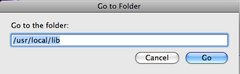
As you can see, I've already typed in the path to go to. Then hit Go and it opens Finder in that directory.
When you install new software on your machine, your Mac usually prompts you to put in a password. That's usually the same password you'd use for the sudo command.
/usr/ is different from /Users/, and is where allegro likes to store its stuff.
By default, `make install' will install all the files in `/usr/local/bin', `/usr/local/lib' etc. You can specify an installation prefix other than `/usr/local' using `--prefix', for instance `--prefix=$HOME'.
This may be what you'd want to do if you don't have a password for sudo. When the Mac you (or your friend) is using was initially installed, do you remember setting some sort of "master admin" username and/or password?
EDIT: beaten
OnlineCop: That was indeed very helpful (I didn't know how to typ in where to go, now I see the 'Go' menu...  ' However, I guess I still need privileges to make a new folder there. I'll install to my user I guess. And I'll probably use Xcode if I can't figure out Code::Blocks (I need to configure global variables and linker settings/linked libraries)
Edit:
...Wait so it's ccmake <dir>...
I configured it to Users/me and generated but now what?
D60-MAC-07:~ sstutzman$ make install
make: *** No rule to make target `install'. Stop.
I configured it to Users/me and generated but now what?
Run make from within the directory where it produced the Makefile.
If it didn't produce a Makefile, check whether it made an Xcode project instead (in case of doubt, you can tell CMake to generate a Makefile by saying something along the lines of cmake -G "UNIX Makefiles", check the documentation to make sure you get the name right).
How do I do that in ccmake?
I got this is cmake:
D60-MAC-07:allegro-4.4 2 sstutzman$ cmake /Users/sstutzman/Desktop/allegro-4.4\ 2 -G "Unix Makefiles"
-- Could NOT find VORBIS (missing: OGG_INCLUDE_DIR VORBIS_INCLUDE_DIR OGG_LIBRARY VORBIS_LIBRARY VORBISFILE_LIBRARY)
-- Configuring done
-- Generating done
-- Build files have been written to: /Users/sstutzman/Desktop/allegro-4.4 2
D60-MAC-07:allegro-4.4 2 sstutzman$
The src is in that folder on my Desktop. What are these build files? Makefiles? There's a number of them in there...what name would this one have?
-------------------------------------------------
I made a xcode project with Cmake...
the build failed with 196 errors and 359 warnings.
what name would this one have?
Makefile.
Let me see if I understand correctly.
You downloaded the .tar.gz sources and put them on your desktop: /Users/--you--/Desktop
You opened Terminal and cd ~/Desktop/allegro-4.4/ (or whatever the allegro source was that was unarchived)
You ran "mkdir Build/ && cd Build/" then "ccmake ..", added a checkbox next to the "build frameworks" (or whatever option is specific to Mac), then specified the "build" or "create" or "generate" or "configure" or whatever option actually starts creating all of the files.
You exited ccmake and immediately (without changing directory or anything) ran "make".
That should have started compiling, along with some sort of progress of the files. They should have compiled everything under the Build/ directory you had created; they won't install anything.
Did it get that far?
Pretty much -- except I tried the .zip version (Don't know why it'd mess up)
Haven't tried it in a while though but it sounds right.
When I tried the Cmake program I made an Xcode project with tons of errors and warnings. I don't remember ccmake terminal having that many and/or failing.
Also I'm missing 'Vorbis' or something -- presumably for 'Logg' which would be nice to use (Although I assume I can install it later)
I'll have to try again tomorrow.
I thought the only difference between the .zip and the .tar.gz files were the line endings, so the actual files should be nearly identical.
The 'cmake' and 'ccmake' are the same underlying program; 'ccmake' is just the graphical interface for the same thing.
I like to compile my programs all from the Terminal. So instead of creating an XCode project and makefile, I just make it for a normal Unix build, then run "make" from the console and see if it compiles. If it does, re-run 'cmake' with the flags to make it an XCode project/makefile, and see if the same errors occur.
Also, if everything compiles, but it won't let you 'make install', you're basically doing everything correctly except that you need to specify that you don't want to try to install it in the sudo-protected /usr/local/ directory: have it point to somewhere on your home directory (usually ~/ or ~/Desktop/ or some-such).
EDIT: Still trying to get this to compile for Felix.
He got the sources from Sourceforge, extracted them to his desktop: ~/Desktop/allegro-4.4/.
He opened Terminal, cd ~/Desktop/allegro-4.4/, then ran "mkdir Build/", "cd Build/", then "ccmake ..".
He toggled to Advanced mode, then changed CMAKE_INSTALL_PREFIX from /usr/local to ~/usr/local (tilde at the front). He also set WANT_FRAMEWORKS from NO to YES.
He also defined the following variables:
  export CPLUS_INCLUDE_PATH=~/usr/local/include:$CPLUS_INCLUDE_PATH
  export C_INCLUDE_PATH=~/usr/local/include:$C_INCLUDE_PATH
  export PATH=$PATH:~/usr/local/bin
  export LD_LIBRARY_PATH=~/usr/local/lib:$LD_LIBRARY_PATH
He compiled allegro and ran make install.
When that compiled and started working, he tried to compile his game. I provided a Makefile so he didn't have to recompile all the time, and got this compile error:
$ make

g++ -o "./bin/test" -W -Wall -g3 -ggdb3 -O0 -pg ./obj/Ball.o ./obj/Paddle.o ./obj/Pong.o ./obj/Powerup.o  `allegro-config --libs`

ld: warning: in /Users/sstutzman/usr/local/lib/liballeg-main.a, file is not of required architecture
ld: warning: in /Users/sstutzman/usr/local/lib/liballeg.dylib, file is not of required architecture
I had him try to add "-m32" to the end of his linking command, and it got rid of that error, but then gave him this:
$ make

g++ -o "./bin/test" -W -Wall -g3 -ggdb3 -O0 -pg -m32 ./obj/Ball.o ./obj/Paddle.o ./obj/Pong.o ./obj/Powerup.o  `allegro-config --libs`

ld: warning: in ./obj/Ball.o, file is not of required architecture
ld: warning: in ./obj/Paddle.o, file is not of required architecture
ld: warning: in ./obj/Pong.o, file is not of required architecture
ld: warning: in ./obj/Powerup.o, file is not of required architecture
We tried changing from "-m32" to "-m64", but that just gave the original error (since allegro wasn't compiled as a 64-bit).
He's running Snow Leopard (10.6). I don't get this error on Leopard (10.5), so I'm not sure what's going wrong.
Posting here since 'sending to top' doesn't announce new posts from the main page.